This memory card matching game is a classic problem often presented in frontend interviews, including those at Tekion, Zepto, Plum, etc. The challenge involves creating an interactive card game where the user tries to find matching pairs by flipping cards face up. The implementation requires a thorough understanding of React, particularly with state management and user interactions.
Concepts
- State management: Utilizing React hooks to manage the game's state, including which cards are flipped or matched.
- Grid rendering: Displaying cards in a grid format to represent the game board.
- Controlled user interaction: Handling user clicks to flip cards while ensuring game logic is honored.
- Timing: Using
setTimeoutto manage delays for unmatched cards that need to flip back. - Game state: Keeping track of the game’s status, including matched pairs and active cards
Problem Breakdown
The memory card game's functionality revolves around several core components:
- Card structure: Each card needs an id, value, flipped state, and matched state. For example, a card could be structured as:
- How matching works: When two cards are selected, their values are compared. If they match, they remain face up; if not, they flip back after a delay.
{ id: 1, value: 'A', flipped: false, matched: false }- Preventing extra clicks: Disable interaction while the game is evaluating the match outcome to avoid unintended behavior.
- Handling wrong match delay: Using
setTimeoutto briefly show an error state for unmatched cards before flipping them back. - End condition: The game ends when all pairs are matched, requiring a check for the complete state of the game board.
Solution
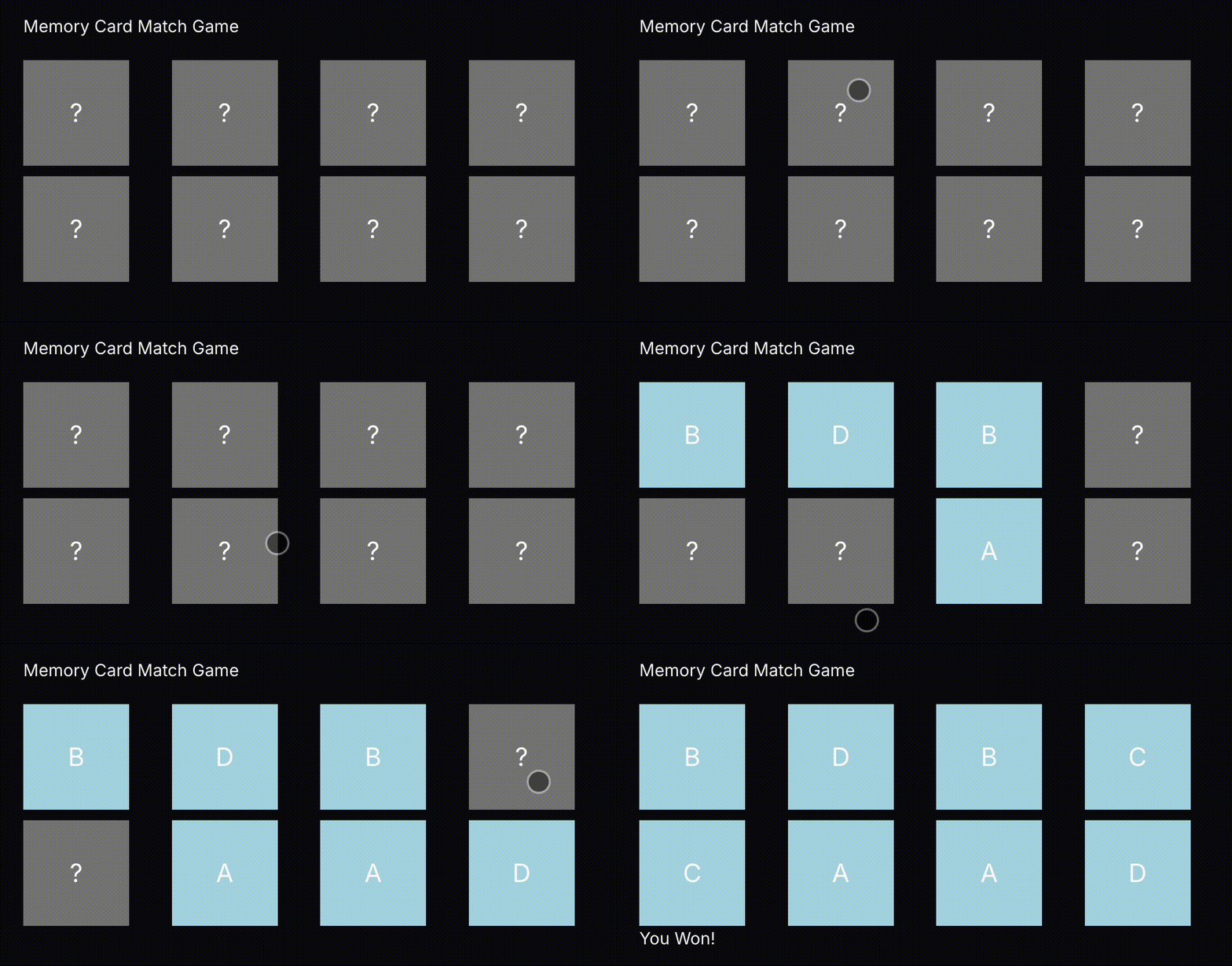
To implement the Memory Card Match Game, we will manage the game's state using React functional components and hooks. The entire implementation will be structured in a single file App.tsx. Below is a detailed explanation of the approach followed by the corresponding code.
Approach:
- Generate a deck of cards with pairs and shuffle them.
- Render the cards in a grid layout.
- Handle the click event to flip cards and check for matches.
- Implement visual feedback for correct and incorrect matches.
- Check for game completion and render an appropriate message.
Implementation:
import React, { useState, useEffect } from 'react';
const cardValues = ['A', 'A', 'B', 'B', 'C', 'C', 'D', 'D'];
const shuffleArray = (array) => {
for (let i = array.length - 1; i > 0; i--) {
const j = Math.floor(Math.random() * (i + 1));
[array[i], array[j]] = [array[j], array[i]];
}
return array;
};
const App = () => {
const [cards, setCards] = useState(shuffleArray([...cardValues]).map((value, index) => ({
id: index,
value,
flipped: false,
matched: false
})));
const [flippedIndices, setFlippedIndices] = useState([]);
const [disableClicks, setDisableClicks] = useState(false);
const handleCardClick = (index) => {
if (disableClicks || cards[index].flipped || cards[index].matched) return;
const newCards = [...cards];
newCards[index].flipped = true;
setFlippedIndices([...flippedIndices, index]);
setCards(newCards);
};
useEffect(() => {
if (flippedIndices.length === 2) {
setDisableClicks(true);
const [firstIndex, secondIndex] = flippedIndices;
const areMatched = cards[firstIndex].value === cards[secondIndex].value;
if (!areMatched) {
setTimeout(() => {
const newCards = [...cards];
newCards[firstIndex].flipped = false;
newCards[secondIndex].flipped = false;
setCards(newCards);
setDisableClicks(false);
}, 1000);
} else {
const newCards = [...cards];
newCards[firstIndex].matched = true;
newCards[secondIndex].matched = true;
setCards(newCards);
setDisableClicks(false);
}
setFlippedIndices([]);
}
}, [flippedIndices]);
const isGameComplete = cards.every(card => card.matched);
return (
<div>
<h1>Memory Card Match Game</h1>
<div style={{ display: 'grid', gridTemplateColumns: 'repeat(4, 1fr)', gap: '10px' }}>
{cards.map((card, index) => (
<div
key={card.id}
onClick={() => handleCardClick(index)}
style={{
width: '100px',
height: '100px',
backgroundColor: card.flipped || card.matched ? 'lightblue' : 'gray',
display: 'flex',
justifyContent: 'center',
alignItems: 'center',
cursor: 'pointer',
fontSize: '24px'
}}>
{card.flipped || card.matched ? card.value : "?"}
</div>
))}
</div>
{isGameComplete && <h2>You Won!</h2>}
</div>
);
};
export default App
Conclusion
In this coding challenge, interviewers evaluate your understanding of React fundamentals, particularly state management and user interaction. Key takeaways include the importance of managing UI states effectively and the ability to write clean, maintainable code. This exercise also demonstrates how to implement game logic while maintaining a responsive UI.
Similar Questions
- Build a To-Do List Application with React.
- Implement a Tic-Tac-Toe Game using React.
- Create a Quiz App that tracks scores.
- Develop a Simple E-commerce Shopping Cart.
- Code a Responsive Navigation Menu with React.