This is a frontend system design problem commonly asked at Google where the goal is to build a draggable list of notes. Users should be able to reorder items using drag-and-drop, and the updated order should persist even after refreshing the page. The focus is entirely on frontend behavior, handling user interactions, managing state, and ensuring persistence.
Concepts
The problem touches multiple core frontend concepts.
- First is drag-and-drop handling, which can be implemented using native HTML5 drag events or pointer/mouse events.
- Second is state management, where the list order is maintained as an array and updated based on user actions.
- Third is DOM updates, ensuring the UI reflects the latest order instantly.
- Fourth is persistence, typically using localStorage to save and restore the list state.
- Finally, there is UX consideration, such as visual feedback while dragging.
Problem Breakdown
We start with a simple list of notes, for example an array of strings or objects. Each item should be rendered as a draggable element.The core challenge is detecting how the order changes when a user drags one item and drops it at another position. This means we need to track:
Which item is being dragged
Where it is dropped
How to update the array accordingly
Another part is ensuring that the updated order is saved so that when the page reloads, the list remains the same. This introduces persistence logic.
So the problem can be broken into:
Render list
Enable dragging
Detect drop position
Reorder array
Persist updated list
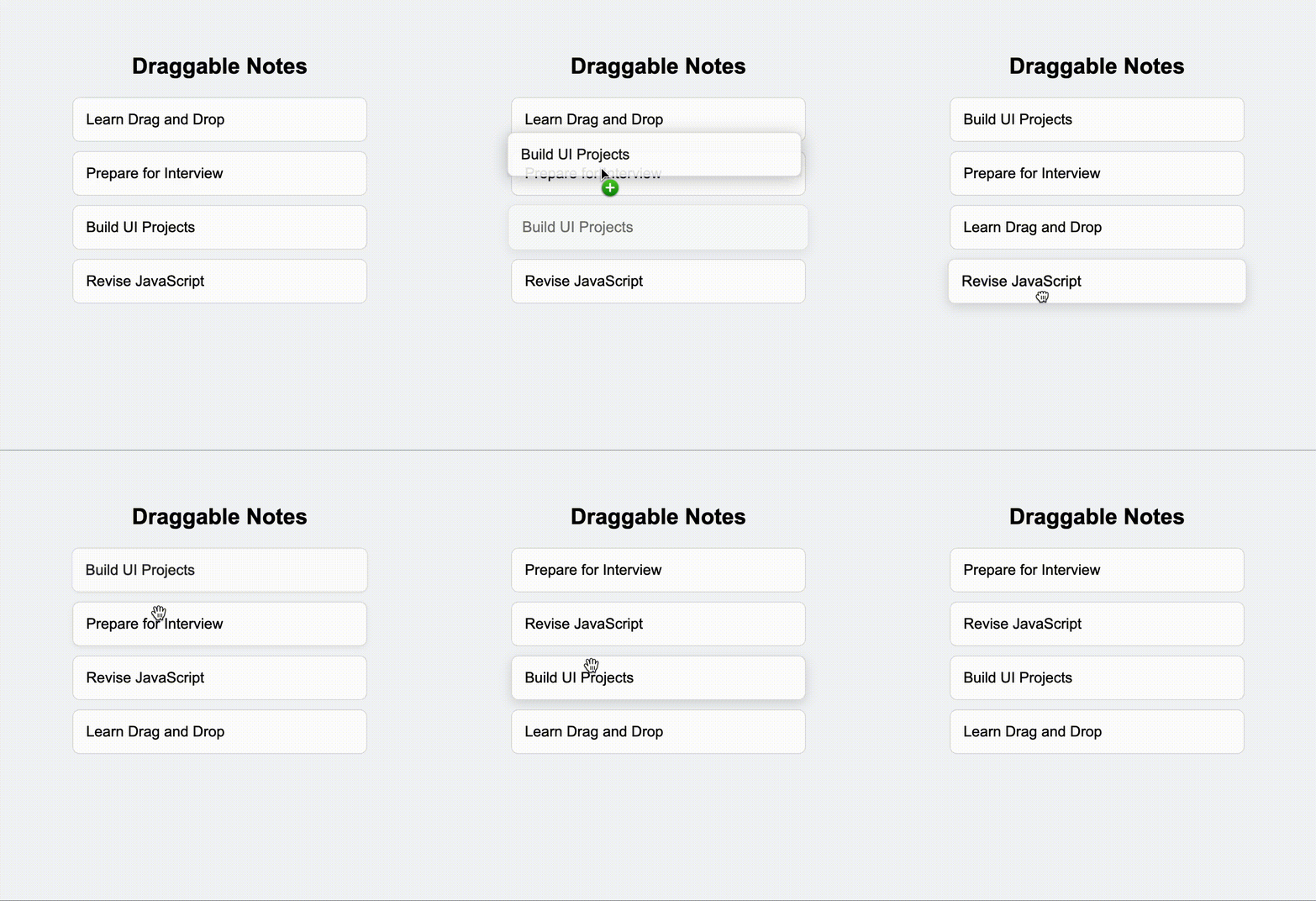
Solution
We can implement this using basic HTML drag events.
Each list item is marked as draggable. When dragging starts, we store the index of the dragged item. When dragging over another item, we prevent default behavior to allow dropping. On drop, we reorder the list.
Here is a simple implementation:
<!DOCTYPE html>
<html lang="en">
<head>
  <meta charset="UTF-8" />
  <title>Draggable Notes</title>
  <link rel="stylesheet" href="./index.css" />
</head>
<body>

  <div class="container">
    <h2>Draggable Notes</h2>
    <div id="list" class="list"></div>
  </div>

  <script src="./draggable.js"></script>
</body>
</html>body {
font-family: Arial, sans-serif;
background: #f4f6f8;
display: flex;
justify-content: center;
margin-top: 60px;
}
.container {
width: 320px;
}
h2 {
text-align: center;
margin-bottom: 20px;
}
.list {
display: flex;
flex-direction: column;
gap: 10px;
}
.item {
background: white;
padding: 14px;
border-radius: 8px;
cursor: grab;
border: 1px solid #e0e0e0;
transition: all 0.2s ease;
}
.item:hover {
box-shadow: 0 4px 12px rgba(0, 0, 0, 0.12);
}
.item:active {
cursor: grabbing;
transform: scale(1.02);
}
.dragging {
opacity: 0.5;
}const listEl = document.getElementById("list");
let notes = JSON.parse(localStorage.getItem("notes")) || [
"Learn Drag and Drop",
"Prepare for Interview",
"Build UI Projects",
"Revise JavaScript"
];
let dragIndex = null;
function render() {
listEl.innerHTML = "";
notes.forEach((note, index) => {
const item = document.createElement("div");
item.className = "item";
item.innerText = note;
item.draggable = true;
item.addEventListener("dragstart", () => {
dragIndex = index;
item.classList.add("dragging");
});
item.addEventListener("dragend", () => {
item.classList.remove("dragging");
});
item.addEventListener("dragover", (e) => {
e.preventDefault();
});
item.addEventListener("drop", () => {
const draggedItem = notes[dragIndex];
notes.splice(dragIndex, 1);
notes.splice(index, 0, draggedItem);
localStorage.setItem("notes", JSON.stringify(notes));
render();
});
listEl.appendChild(item);
});
}
render();Explanation of the logic:
This implementation is a simple draggable list where each note can be reordered by dragging and dropping.
- We first store the list of notes in an array. This array is the single source of truth. Whenever the order changes, we update this array and re-render the UI.
- Each note is rendered as a draggable element. When dragging starts, we store the index of that item. When the item is dropped on another item, we remove it from its original position and insert it at the new position using array operations.
- After updating the order, we save the new list in localStorage so that the order remains the same even after refreshing the page.
Conclusion
This problem is less about complex algorithms and more about handling user interaction cleanly. The key is to think in terms of state changes rather than DOM manipulation. Once you model the list as an array, reordering becomes straightforward. Persistence is a small addition but shows production thinking. Interviewers are looking for clarity in approach, not perfection in UI.
Similar Questions
- Design a Kanban board with draggable cards
- Implement sortable table rows
- Build a drag-and-drop file uploader
- Create a nested draggable list (tree structure)
- Add keyboard accessibility to drag-and-drop interactions