
This frontend interview problem is commonly posed by companies like Fleek, Atlassian, and Zepto. Candidates are tasked with building a Nested Folder Explorer, akin to the file management system found in Integrated Development Environments (IDEs) such as Visual Studio Code. The challenge assesses a candidate's grasp of tree structures, recursion, and state management in a user interface context.
Concepts
- Tree Data Structure: The foundational model to represent folders and files hierarchically.
- Recursion: A method for rendering nested folders, where each folder can contain more folders or files.
- State Management (Expand/Collapse): Tracking the open or closed state of folders to control the display of their contents.
- Rendering Nested UI: Properly displaying the hierarchy of files and folders in the UI through indentation.
Problem Breakdown
To build a Nested Folder Explorer, we need to design an effective data structure representing folders and their contents:
- Data Structure Design: Each folder/file can be represented as an object with properties to indicate its type (folder or file), contents (children), and whether it's a folder.
- Nesting: The structure allows for multiple levels of folders, enabling versatility in organizing files.
- Expand/Collapse Behavior: Clicking on a folder should toggle the visibility of its children.
- Edge Cases: Handle scenarios like an empty folder or deeply nested structures gracefully.
Solution
The approach consists of defining a tree-like data structure and employing a recursive function to render each node. Additionally, we'll implement the toggle logic to manage the expand/collapse state of folders.
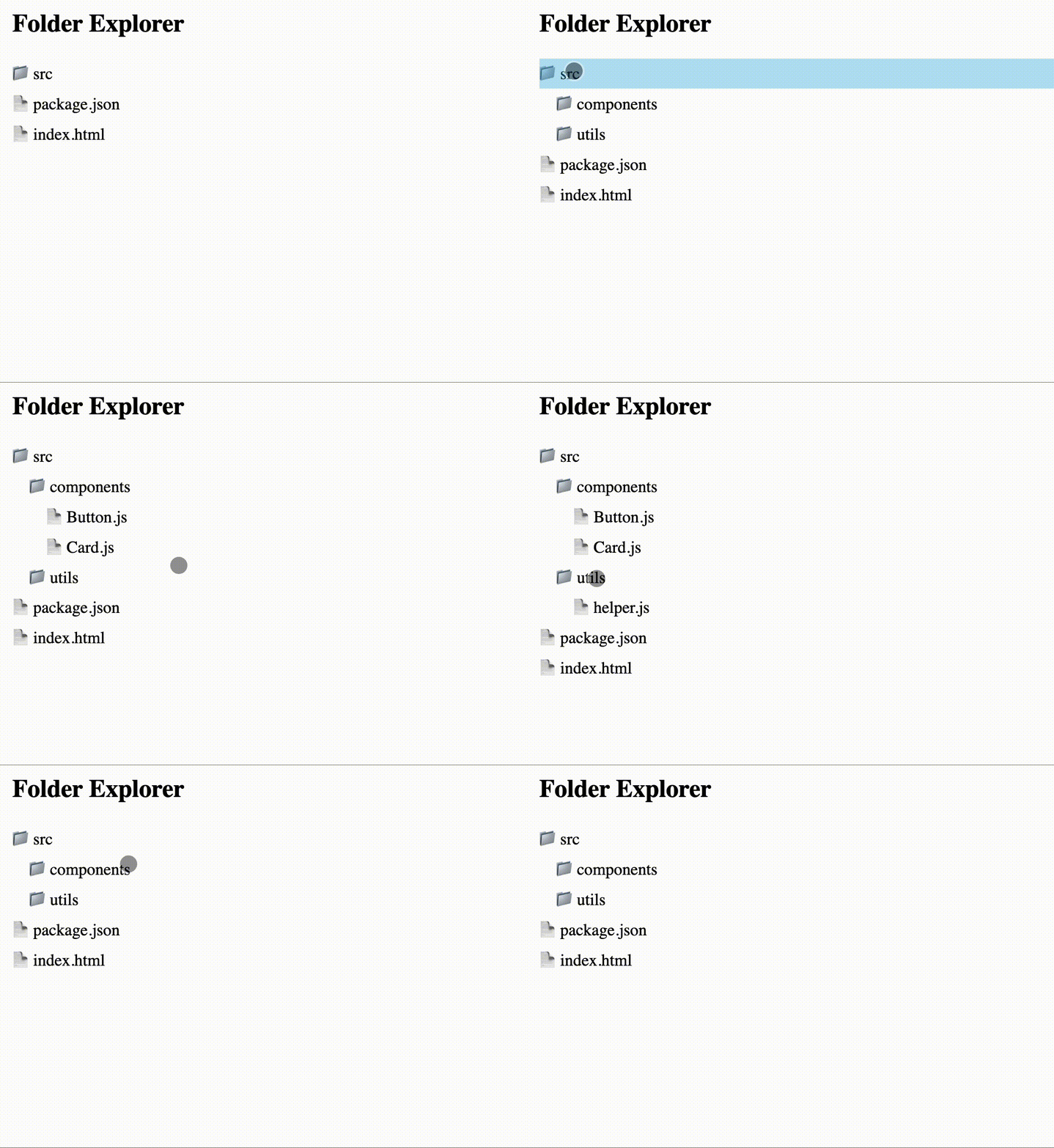
Here's a simple structure for folders and files:
const data = [ { name: "src", isFolder: true, children: [ { name: "components", isFolder: true, children: [ { name: "Button.js", isFolder: false }, { name: "Card.js", isFolder: false } ] }, { name: "utils", isFolder: true, children: [ { name: "helper.js", isFolder: false } ] } ] }, { name: "package.json", isFolder: false }, { name: "index.html", isFolder: false } ];
Next, we will render this structure using a recursive function:
const root = document.getElementById("explorer"); function createNode(node) { const div = document.createElement("div"); div.className = `node ${node.isFolder ? "folder" : "file"}`; div.textContent = node.name; if (node.isFolder) { const childrenContainer = document.createElement("div"); childrenContainer.className = "children"; node.children.forEach(child => { childrenContainer.appendChild(createNode(child)); }); div.addEventListener("click", (e) => { e.stopPropagation(); childrenContainer.classList.toggle("open"); }); const wrapper = document.createElement("div"); wrapper.appendChild(div); wrapper.appendChild(childrenContainer); return wrapper; } return div; } // Render root data.forEach(item => { root.appendChild(createNode(item)); });<!DOCTYPE html> <html lang="en"> <head> <meta charset="UTF-8" /> <title>Folder Explorer</title> <style> .node { cursor: pointer; padding: 4px 0; } .folder::before { content: "📁 "; } .file::before { content: "📄 "; } .children { margin-left: 16px; display: none; } .children.open { display: block; } </style> </head> <body> <div class="container"> <h2>Folder Explorer</h2> <div id="explorer"></div> </div> <script src="./index.js"></script> </body> </html>
This JavaScript code creates a visual representation of the file system. Each folding element responds to clicks, toggling its expansion and collapse via inline styles.
Conclusion
By approaching this problem, interviewers aim to evaluate your understanding of data structures and how you manage state in a rendering context. Key takeaways include grasping recursive patterns, effectively managing UI states, and developing a minimal yet functional codebase. These skills are essential in real-world application development.
Similar Questions
- Implement a To-Do list with expandable categories.
- Build a file upload UI that reflects folder structures.
- Design a breadcrumb navigation system for a nested structure.
- Develop a tagging system where tags can have sub-tags.
- Create a simple dashboard that allows item grouping.