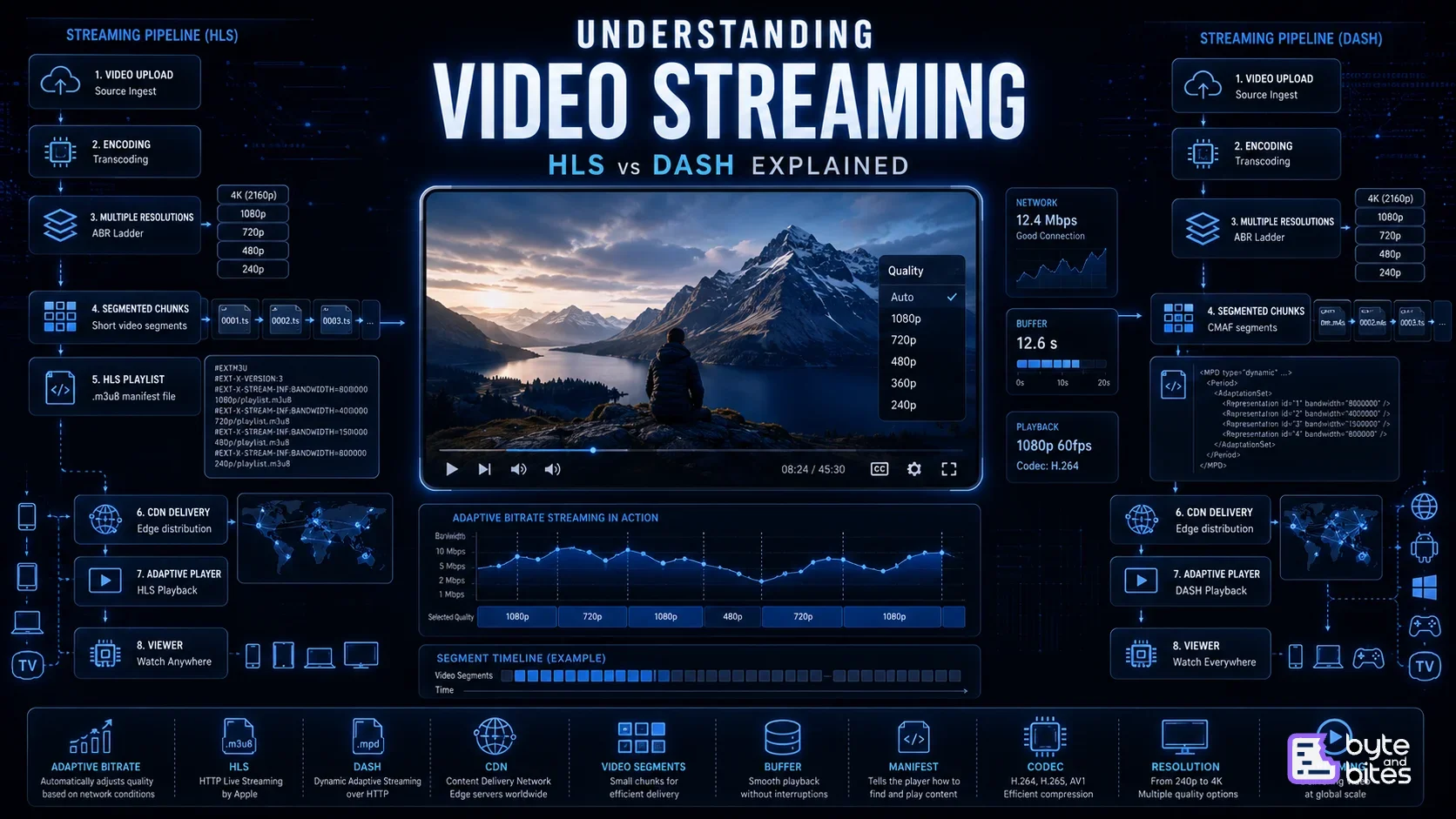
Have you ever noticed that when your internet connection becomes slower, Netflix or YouTube doesn't stop playing immediately?
Instead:
- The video quality drops from 1080p to 720p.
- Playback continues without interruption.
- When the network improves, the quality automatically increases again.
To the user, this feels almost magical.
But behind the scenes, your video isn't being downloaded as one large file.
Instead, it's being:
- encoded into multiple qualities,
- split into hundreds of tiny segments,
- distributed across CDNs,
- and intelligently selected by the video player in real time.
This technique is called Adaptive Bitrate Streaming (ABR), and the two most widely used protocols that enable it are HLS (HTTP Live Streaming) and MPEG-DASH (Dynamic Adaptive Streaming over HTTP).
In this part, we'll understand how modern video streaming works, why HLS and DASH exist, how they're different, and when each one is the right choice.
Why Can't We Just Download the Entire Video?
Imagine streaming a two-hour movie.
A 4K HDR movie might be 15 - 30 GB in size.
If your player downloaded the entire file before playback:
- You'd wait several minutes before the movie starts.
- Any change in network speed would interrupt playback.
- Mobile users would waste enormous amounts of data.
Clearly, this isn't practical.
Instead, streaming platforms download only a few seconds of video at a time.
Entire Movie (25 GB)
█████████████████
↓
Small Chunks
■ ■ ■ ■ ■ ■ ■ ■ ■ ■ ■ ■ ■ ■ ■
This simple idea completely changes how video delivery works.
The Modern Streaming Pipeline
Every video follows a pipeline before reaching your screen.
Upload
→
Encode
→
Package
→
CDN
→
Player
→
Viewer
Let's understand each step.
Step 1: Upload & Encoding
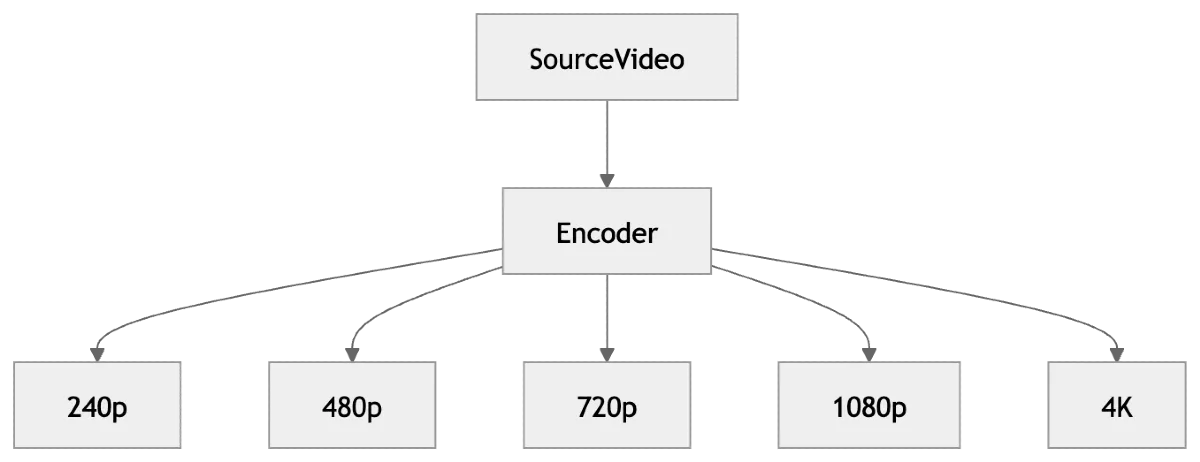
Everything begins with a single source video.
4K Master Video
↓
Encoder
↓
240p
480p
720p
1080p
4K
The video is transcoded into multiple resolutions and bitrates.
Why?
Because every user has a different device and internet speed.
For example:
| Resolution | Typical Bitrate |
|---|---|
| 240p | 300 Kbps |
| 480p | 1 Mbps |
| 720p | 3 Mbps |
| 1080p | 5 Mbps |
| 4k | 15-25 Mbps |
Now the player has multiple versions of the same video to choose from.
Step 2: Video Segmentation
Instead of storing one giant video file, it's split into small pieces.
Movie.mp4
↓
segment001
segment002
segment003
segment004
...
Each segment is usually between 2 - 6 seconds long.
This is one of the key ideas behind adaptive streaming.
The player only requests the next segment when it needs it.
Step 3: The Manifest File
Now comes the secret sauce.
How does the player know where all those segments are?
Instead of downloading the entire movie, it first downloads a tiny manifest.
Think of it as a table of contents for the video.
HLS
playlist.m3u8
DASH
manifest.mpd
These files contain:
- available resolutions,
- segment locations,
- codecs,
- durations,
- bitrate information.
Without the manifest, the player has no idea what to request next.
HLS Explained
HLS (HTTP Live Streaming) was introduced by Apple.
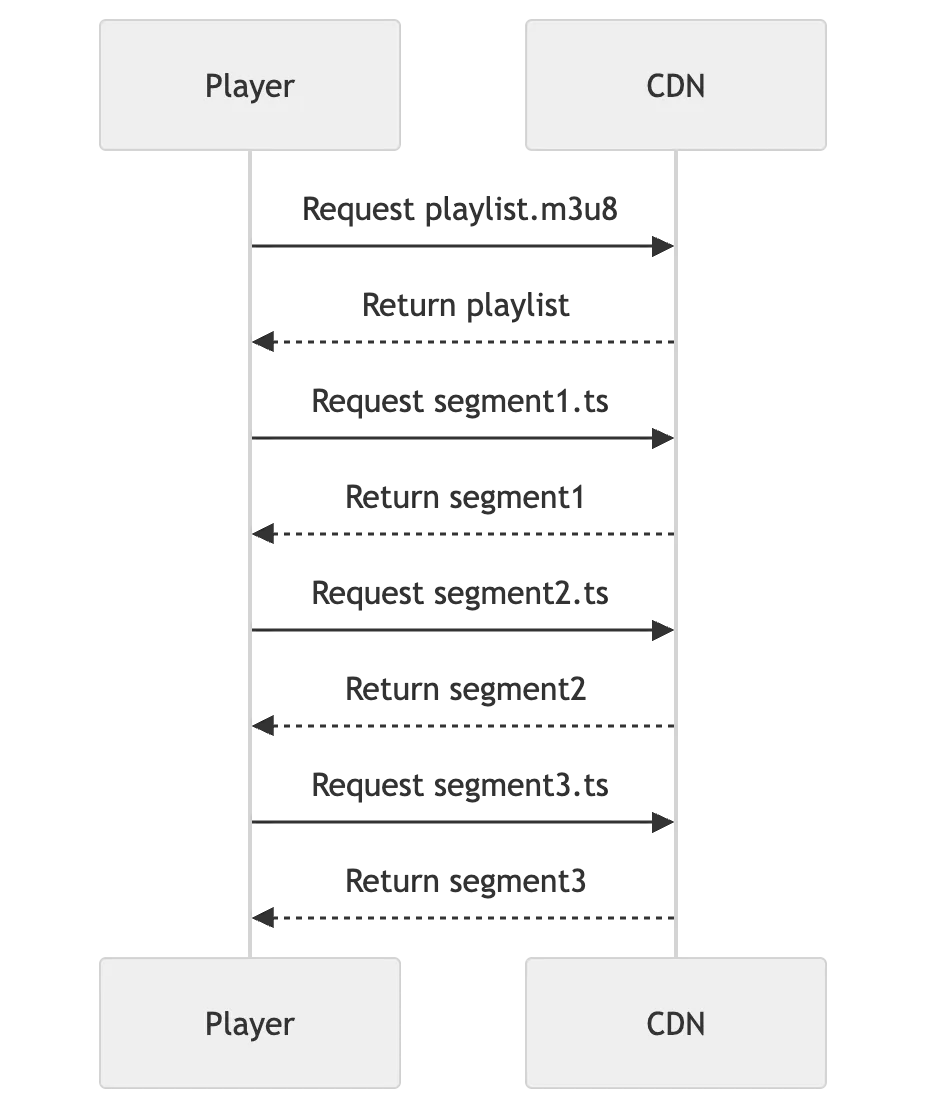
The basic flow looks like this:
The player:
Downloads the playlist.
↓
Reads available qualities.
↓
Starts requesting video segments based on bandwidth.
↓
Switches quality whenever needed.
Everything happens over standard HTTP, making HLS easy to cache using CDNs.
DASH Explained
MPEG-DASH follows the same core idea.
Instead of an .m3u8 playlist, it uses an .mpd manifest.
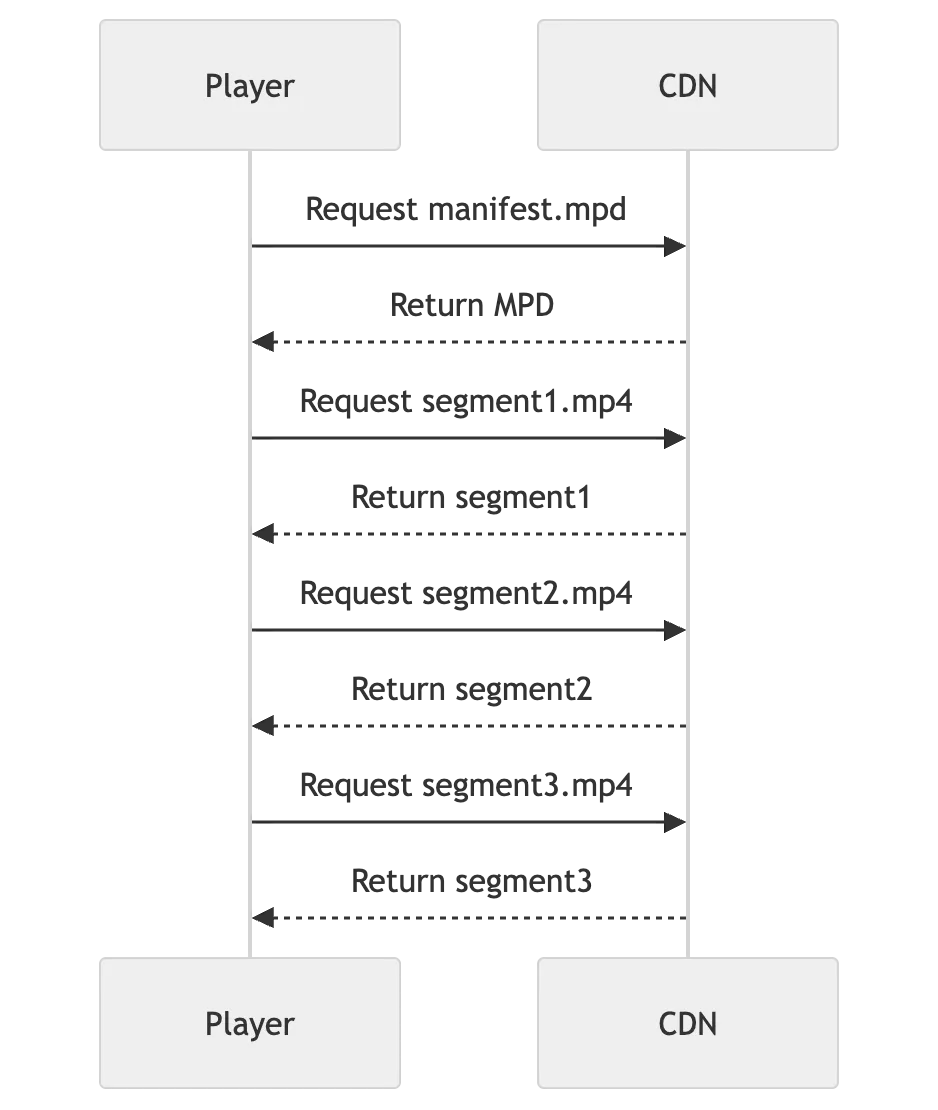
The playback process is nearly identical.
The main differences are the manifest format, packaging options, and ecosystem support.
Adaptive Bitrate Streaming (ABR)
Now imagine your internet speed changes while you're watching.
Should playback stop?
No.
The player continuously measures:
- available bandwidth,
- buffer health,
- download speed,
- device performance.
Based on this information, it decides which quality to request next.
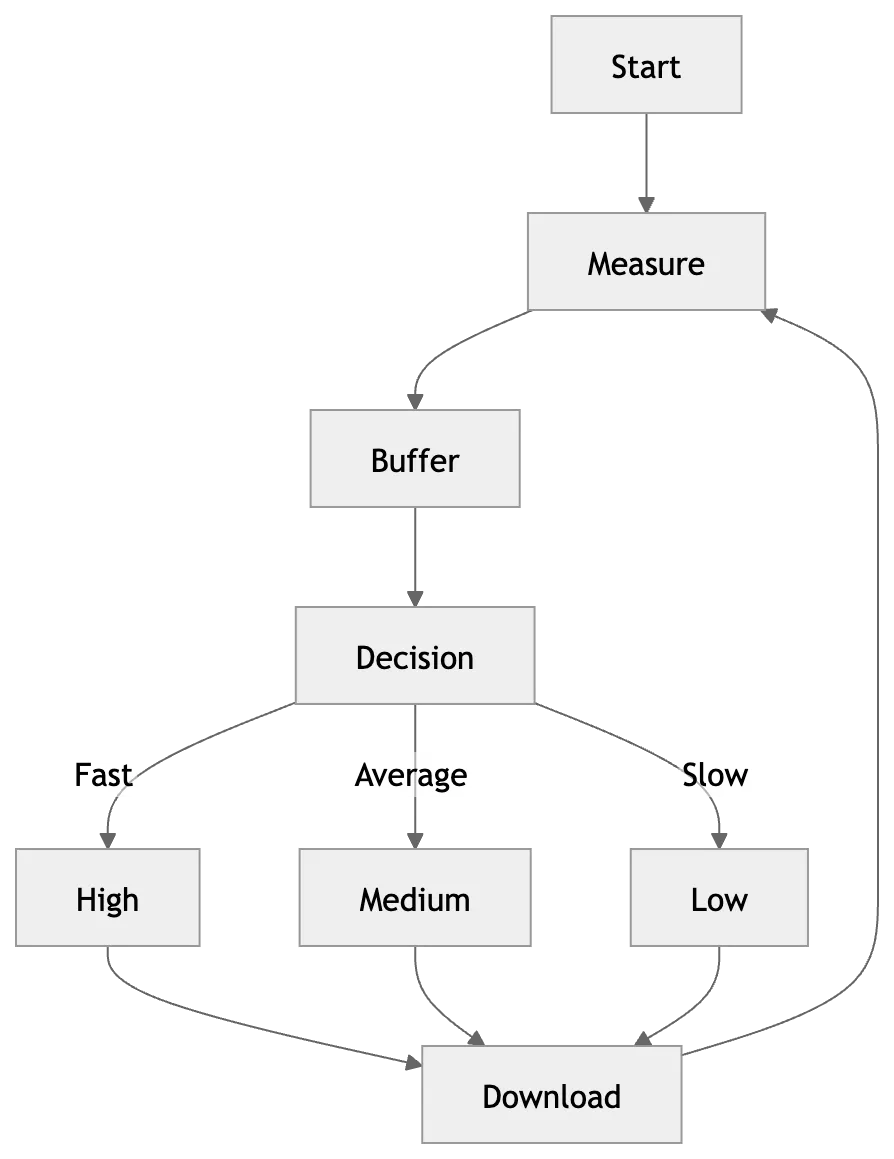
This process happens every few seconds.
We rarely notice it.
A Real Example
Suppose we are watching in 1080p.
Our bandwidth suddenly drops.
Instead of buffering:
1080p
↓
720p
↓
480p
↓
240p
Playback continues.
When the connection improves:
240p
↓
480p
↓
720p
↓
1080p
Quality increases automatically.
That's Adaptive Bitrate Streaming in action.
The Role of CDNs
Imagine millions of users requesting the same movie.
Should every request go to one server?
Absolutely not.
Instead, video segments are distributed to Content Delivery Networks (CDNs).
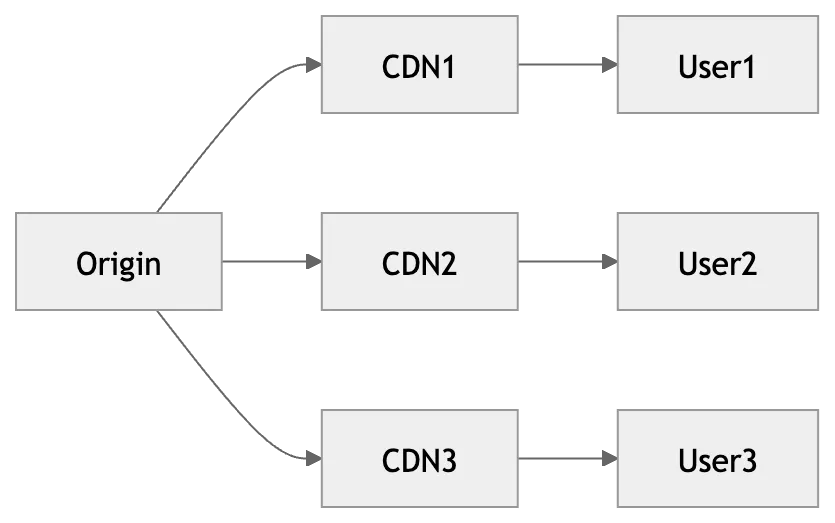
Benefits:
- lower latency,
- reduced origin load,
- faster startup,
- global availability.
HLS vs DASH
| Feature | HLS | MPEG-DASH |
|---|---|---|
| Developed by | Apple | MPEG |
| Manifest | .m3u8 | .mpd |
| Transport | HTTP | HTTP |
| Adaptive Bitrate | ✅ | ✅ |
| Streaming | Live & VOD | Live & VOD |
| Browser Support | Excellent | Excellent (with player support) |
| Ecosystem | Strong on Apple platforms | Broad cross-platform adoption |
| Low-Latency Modes | Supported | Supported |
The choice often depends on platform requirements, playback ecosystem, DRM, and tooling rather than raw capability.
How the Player Thinks
The player continuously asks itself:
Is my internet fast enough?
↓
Yes
↓
Increase Quality
↓
No
↓
Lower Quality
↓
Download Next Segment
This decision loop repeats throughout playback.
Why Segments Instead of One File?
Segmenting video enables:
- Adaptive quality switching
- Faster startup
- Efficient retries
- Better CDN caching
- Live streaming
- Parallel downloads
- Lower memory usage
Without segmentation, modern streaming services wouldn't deliver the smooth experience users expect.
Real-World Streaming Architecture

Each component has a specific responsibility, making the system scalable and resilient.
Common Misconceptions
❌ Streaming is just downloading a video.
Streaming is an ongoing exchange of small media segments, not a single file transfer.
❌ HLS and DASH are video codecs.
They're streaming protocols. The actual video is encoded using codecs such as H.264, H.265 (HEVC), VP9, or AV1.
❌ Higher resolution always means better quality.
Compression efficiency, bitrate, and the codec also play major roles in perceived quality.
Key Takeaways
- Videos are encoded into multiple qualities.
- Large videos are split into small segments.
- Manifest files tell the player where segments are located.
- HLS uses .m3u8 playlists.
- DASH uses .mpd manifests.
- Adaptive Bitrate Streaming allows players to adjust quality dynamically.
- CDNs deliver segments quickly from locations close to users.
Conclusion
Modern video streaming is far more sophisticated than simply downloading a video file. Behind every play button is a pipeline of encoding, segmentation, manifests, CDNs, and intelligent players working together to deliver a seamless experience. Understanding HLS, DASH, and adaptive bitrate streaming provides a strong foundation for anyone interested in frontend performance, networking, or media infrastructure.
The best streaming experience isn't achieved by sending the highest-quality video. It's achieved by sending the right quality at the right time.