JavaScript is often described as a single-threaded language.
That means it can execute only one piece of JavaScript code at a time.
Yet, modern web applications can:
- Fetch data from APIs
- Handle button clicks
- Play videos
- Animate interfaces
- Execute timers
- Update the UI
- Download files
...all seemingly at the same time.
How is that possible?
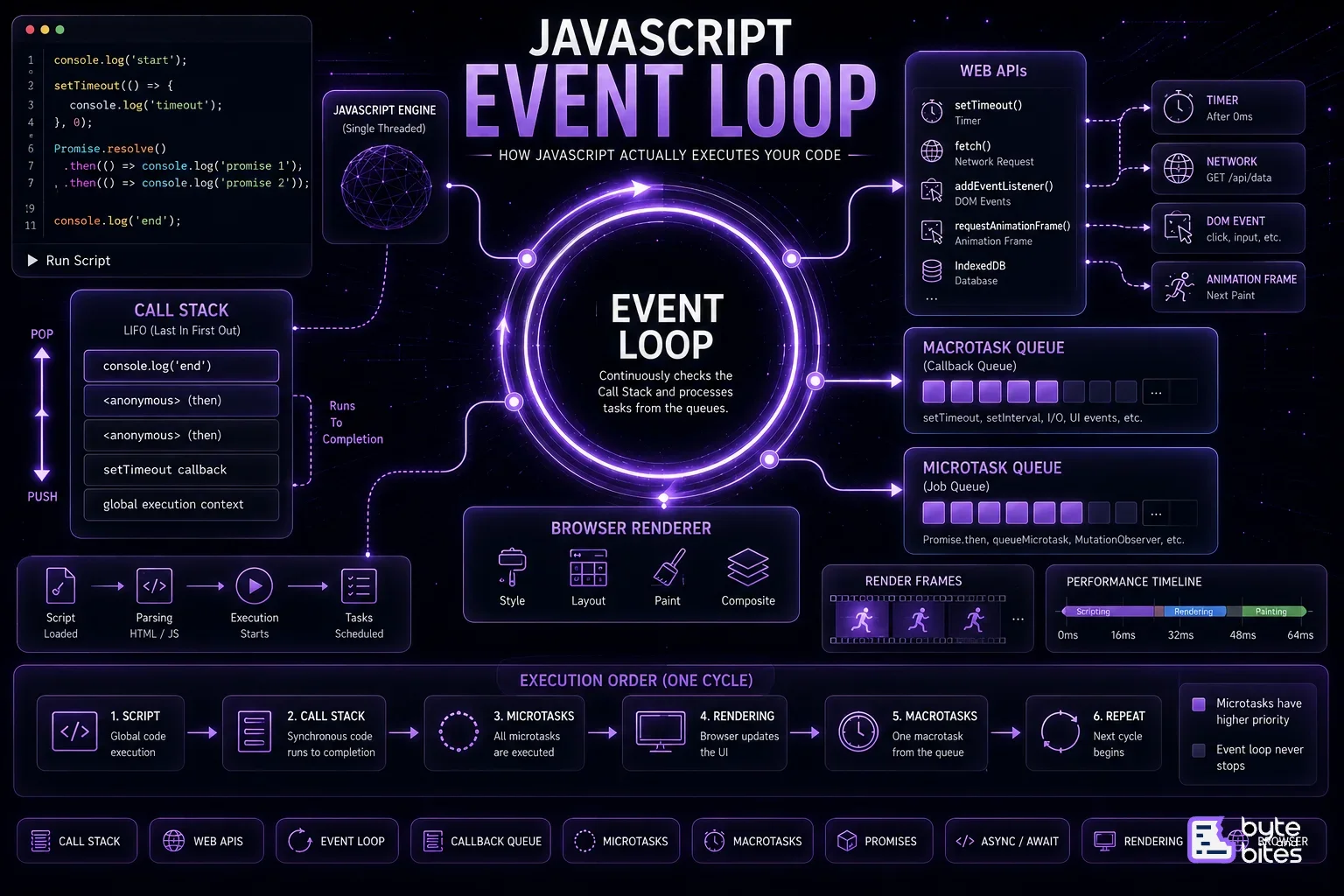
The answer is the JavaScript Runtime.
JavaScript itself isn't doing all these tasks simultaneously. Instead, it relies on the browser (or Node.js) to perform asynchronous work while the Event Loop coordinates when JavaScript should execute the resulting callbacks.
Understanding this execution model is essential for writing performant JavaScript and reasoning about asynchronous code.
The JavaScript Runtime
JavaScript doesn't run in isolation. It runs inside an environment such as a browser or Node.js.
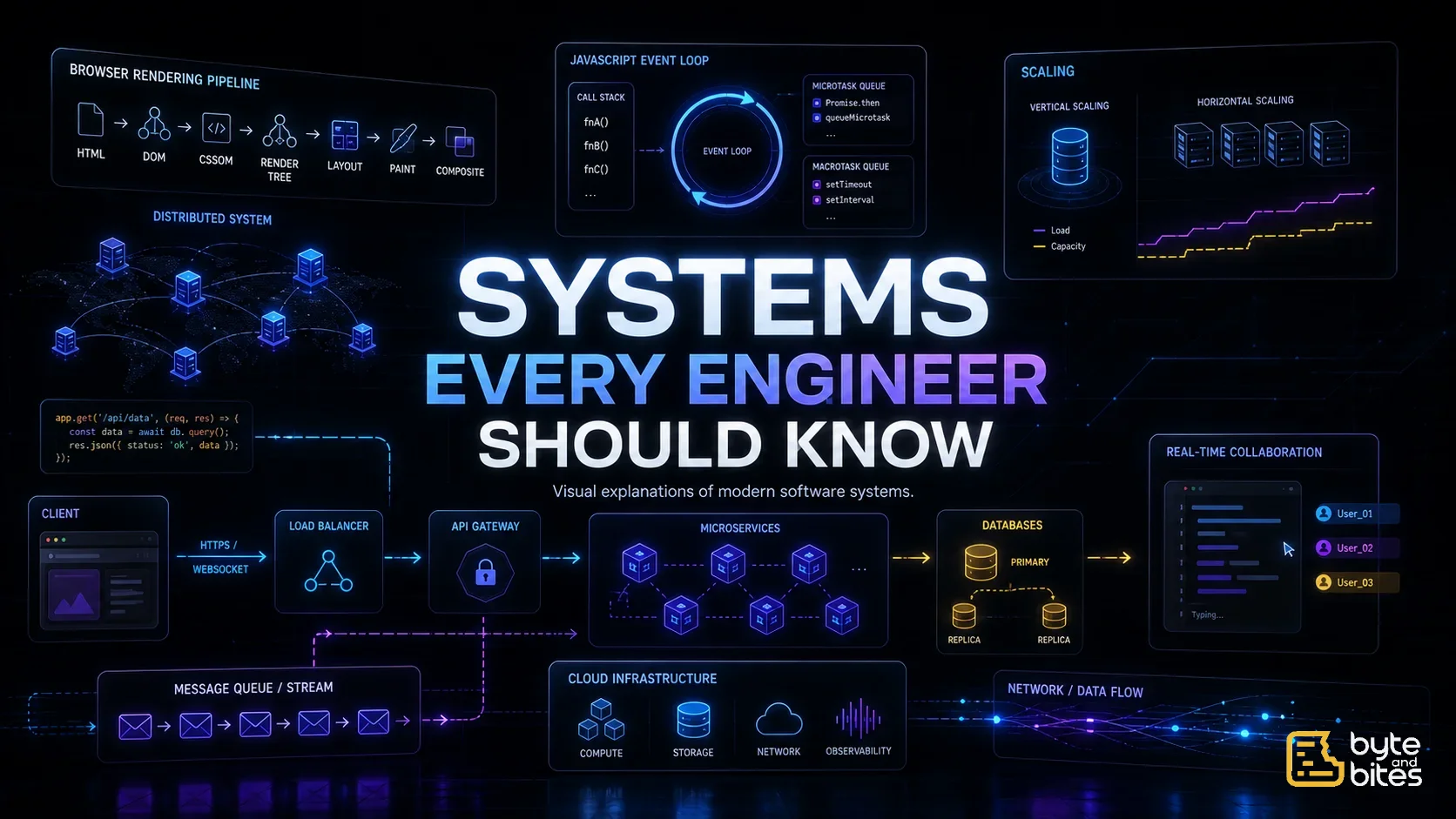
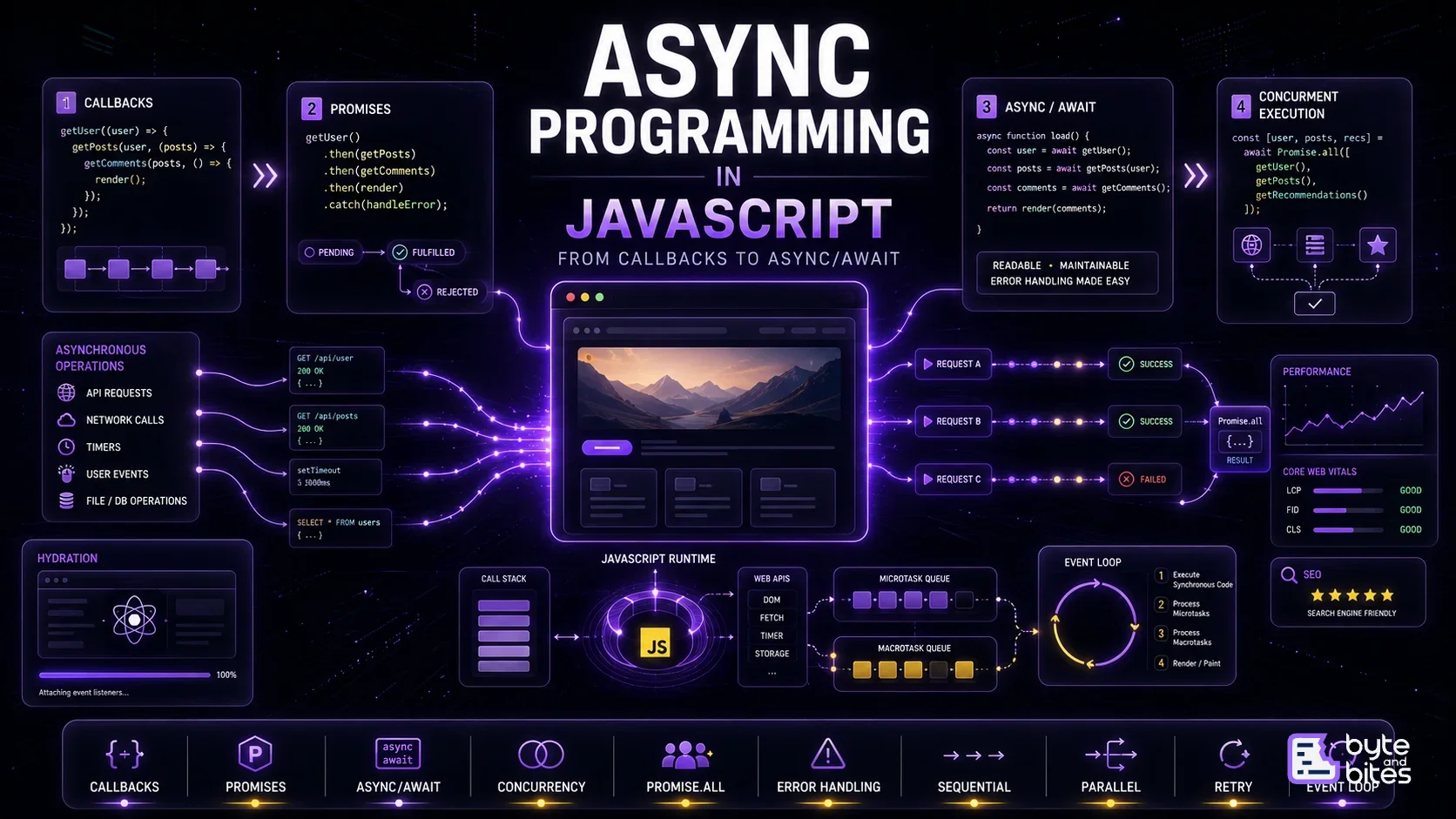
A simplified browser runtime looks like this:
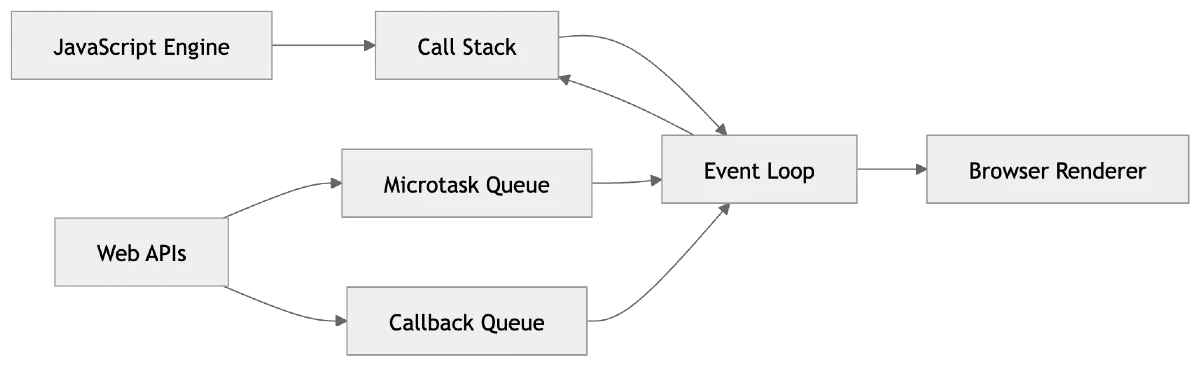
Each component has a specific responsibility.
The Call Stack
The Call Stack is where JavaScript executes synchronous code.
Whenever a function is called, it's pushed onto the stack.
When the function finishes, it's removed.
Think of it like stacking books.
The last book you place on the stack is the first one you remove.
Call Stack
┌─────┐
│ sayHello() │
├─────┤
│ main() │
├─────┤
│ Global() │
└─────┘
As functions return, the stack unwinds until it's empty.
JavaScript Runs to Completion
Consider this code:
console.log("A");
console.log("B");
console.log("C");
Output:
A
B
C
Nothing surprising.
JavaScript executes each statement synchronously before moving to the next.
No other task can interrupt the Call Stack.
This principle is called Run-to-Completion.
Then How Does setTimeout() Work?
Let's look at this example.
console.log("Start");
setTimeout(() => {
console.log("Timeout");
}, 0);
console.log("End");
Many beginners expect:
Start
Timeout
End
Actual output:
Start
End
Timeout
Why?
Because setTimeout() isn't handled by JavaScript itself.
Web APIs
Functions such as:
- setTimeout
- fetch
- DOM Events
- requestAnimationFrame
are provided by the browser.
When JavaScript encounters:
setTimeout(callback, 1000);
The callback is handed over to the browser.
The browser starts the timer while JavaScript continues executing the remaining code.
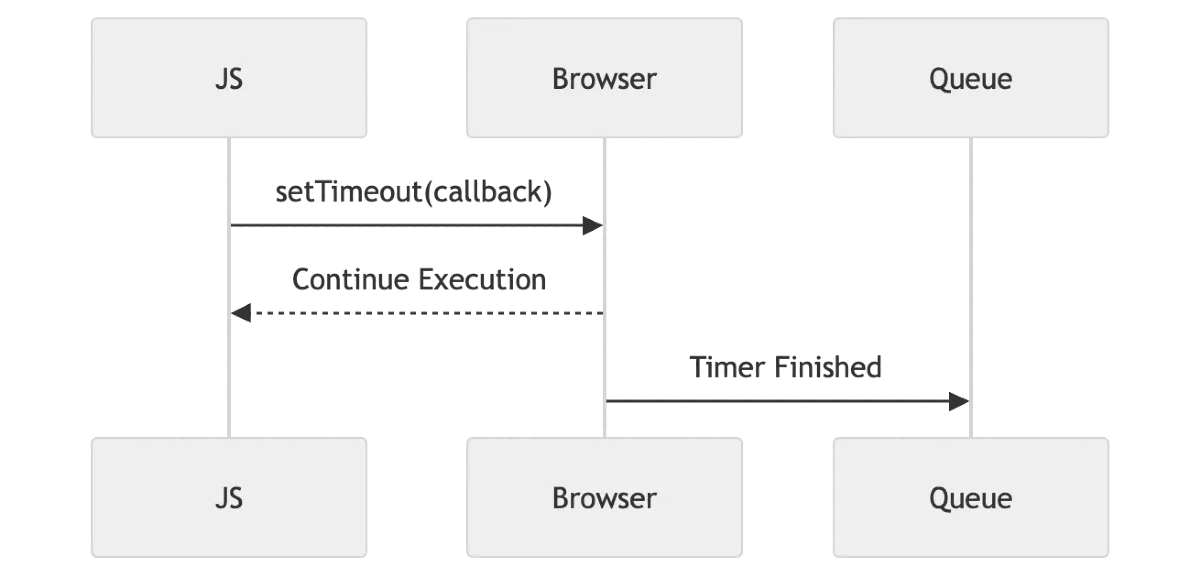
JavaScript never waits for the timer.
Callback Queue (Macrotask Queue)
When an asynchronous task completes, its callback enters the Callback Queue.
Examples include:
- setTimeout
- setInterval
- DOM Events
- MessageChannel
These callbacks don't execute immediately.
They wait until the Call Stack becomes empty.
Callback Queue
┌──── ─┐
│ Timer │
├── ───┤
│ Click Event. │
├── ───┤
│ Message │
└── ───┘
Enter the Event Loop
The Event Loop is surprisingly simple.
It repeatedly asks one question:
"Is the Call Stack empty?"
If the answer is No, it waits.
If the answer is Yes, it moves the next task into the Call Stack.
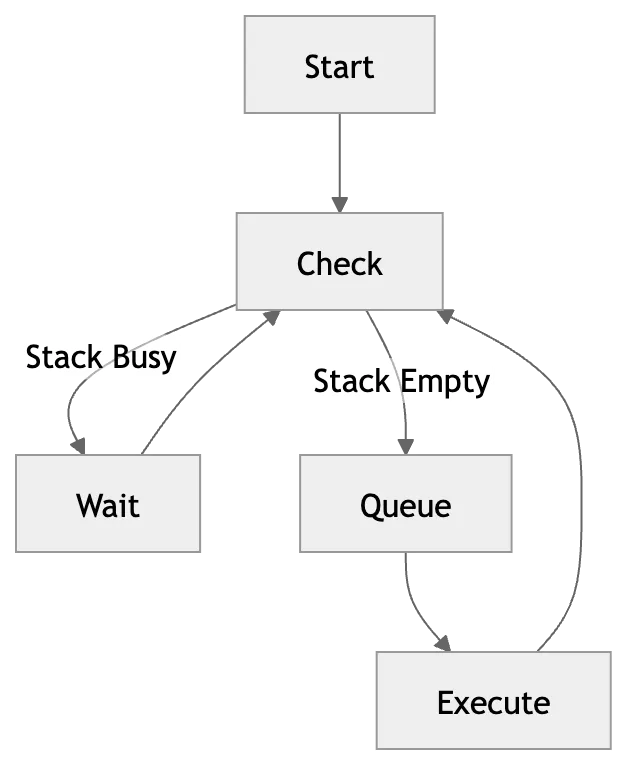
This tiny loop powers asynchronous JavaScript.
Promises Introduce Microtasks
Now consider:
console.log("Start");
Promise.resolve().then(() => {
console.log("Promise");
});
console.log("End");
Output:
Start
End
Promise
Promises don't go into the Callback Queue.
They enter the Microtask Queue.
Microtask Queue
Microtasks have higher priority than macrotasks.
Examples include:
- Promise.then
- catch
- finally
- queueMicrotask
- MutationObserver
Microtask Queue
┌─── ────┐
│ Promise.then │
├───── ──┤
│ queueMicrotask. │
└─── ────┘
Microtasks vs Macrotasks
This is one of the most important concepts in JavaScript.
Execution order:
- Run synchronous code
- Execute all microtasks
- Render (if needed)
- Execute one macrotask
- Repeat
Script
↓
Call Stack
↓
Microtasks
↓
Rendering
↓
Macrotask
↓
Repeat
Why Promises Run Before setTimeout
Example:
console.log("A");
setTimeout(() => console.log("Timeout"));
Promise.resolve().then(() => console.log("Promise"));
console.log("B");
Output:
A
B
Promise
Timeout
Even though setTimeout() appears first, the Promise callback executes earlier because microtasks always have priority over macrotasks.
Async/Await Is Just Promises
Many developers think async/await is different.
It isn't.
async function load() {
await fetch("/users");
console.log("Done");
}
Behind the scenes, await pauses the function and schedules the remaining code as a microtask once the Promise resolves.
Browser Rendering
One common misconception is that the browser renders after every line of JavaScript.
It doesn't.
Rendering happens between Event Loop iterations, after the current task and all queued microtasks have completed.
Script
→
Microtasks
→
Render
→
Macrotask
→
Repeat
This is why long-running JavaScript can freeze the UI.
If the Call Stack never empties, the browser never gets a chance to paint.
A Complete Example
Consider:
console.log("1");
setTimeout(() => console.log("2"));
Promise.resolve().then(() => console.log("3"));
console.log("4");
Let's follow the execution.
- console.log("1")
- Register timer with the browser
- Schedule Promise as a microtask
- console.log("4")
- Call Stack becomes empty
- Execute all microtasks
- Render
- Execute timer callback
Final output:
1
4
3
2
Common Mistakes
❌ Thinking setTimeout(fn, 0) runs immediately
It doesn't. It waits until the current task completes and the Event Loop schedules the callback.
❌ Assuming Promises are synchronous
Promises are asynchronous but execute through the Microtask Queue, giving them higher priority.
❌ Blocking the Event Loop
Heavy synchronous work prevents timers, user interactions, and rendering from occurring.
Browser vs Node.js
The browser and Node.js both implement an Event Loop, but their environments differ.
Browsers provide Web APIs such as timers, Fetch, and DOM events.
Node.js provides its own runtime APIs, including file system operations, networking, and different Event Loop phases.
The core idea remains the same:
- Execute synchronous code.
- Process microtasks.
- Handle queued asynchronous work.
Key Takeaways
- JavaScript is single-threaded.
- The Call Stack executes synchronous code.
- Browsers handle asynchronous operations through Web APIs.
- The Event Loop coordinates when callbacks are executed.
- Microtasks always run before macrotasks.
- Rendering occurs between Event Loop cycles.
- Understanding the Event Loop makes asynchronous JavaScript much easier to reason about.
Conclusion
The JavaScript Event Loop isn't just an implementation detail. It's the foundation of how modern web applications remain responsive while handling asynchronous work. Once you understand how the Call Stack, Web APIs, microtasks, macrotasks, and rendering fit together, concepts like Promises, async/await, timers, and UI performance become much more intuitive.
JavaScript isn't truly multitasking. It creates the illusion of concurrency through a carefully orchestrated Event Loop that keeps your applications responsive while executing one task at a time.