Almost every application you use today depends on a database.
Whether we are transferring money through a banking app, posting a photo on social media, tracking a ride, or chatting with an AI assistant, somewhere in the background a database is storing, retrieving, and updating data.
But not all databases are built for the same purpose.
- A banking application prioritizes consistency and transactions.
- A social media platform needs massive scalability.
- A recommendation engine relies on relationships.
An AI application searches through vector embeddings instead of text.
So, which database should you choose?
The answer isn't simply SQL or NoSQL. Modern software systems often combine multiple database technologies, each optimized for a specific workload.
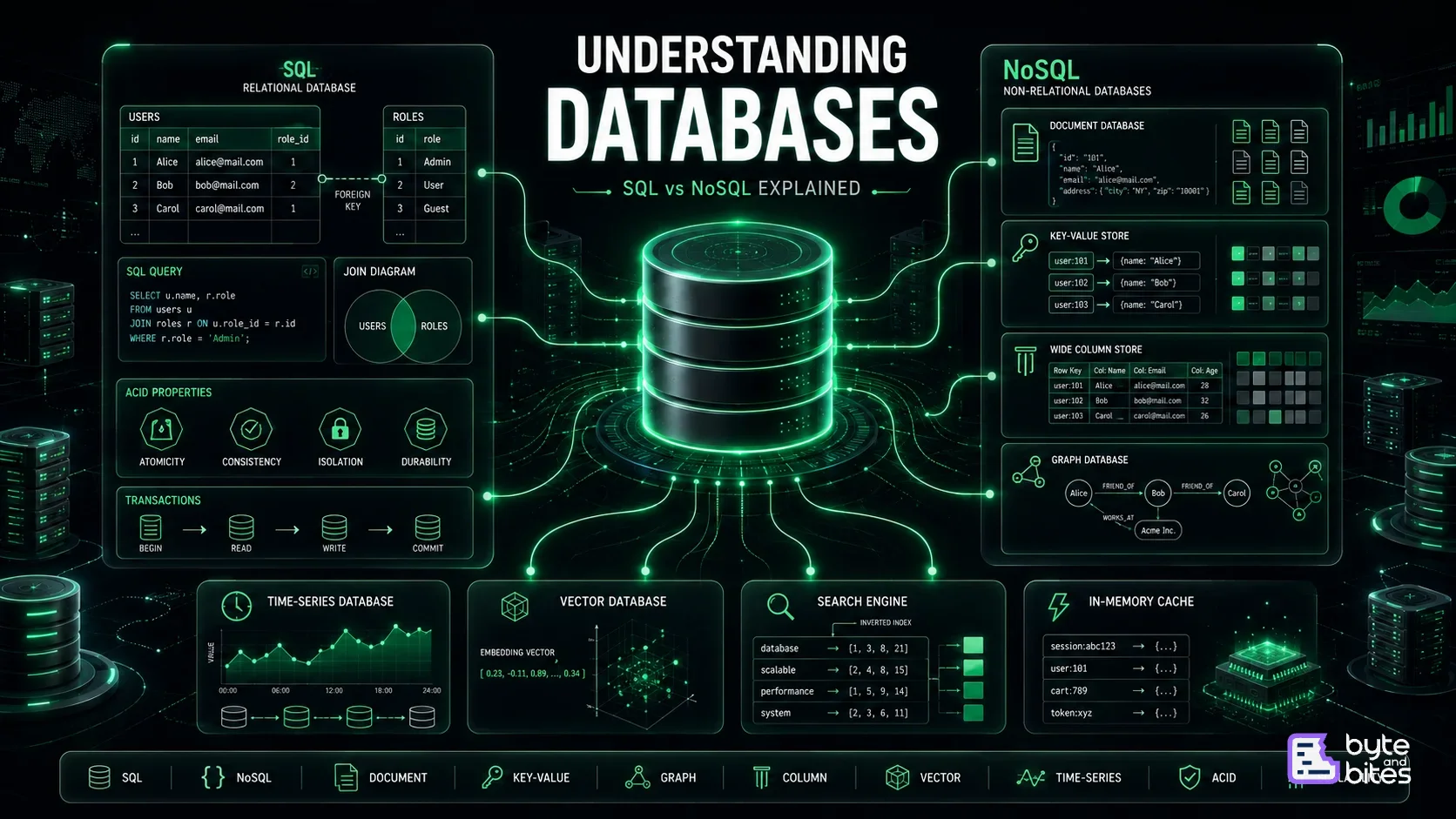
In this article, we'll explore the evolution of databases, understand SQL and NoSQL, discover specialized database types, and learn how to choose the right database for the right problem.
Why Do We Need Databases?
Imagine building an e-commerce application.
You need to store:
- Users
- Products
- Orders
- Payments
- Reviews
You could save everything in files.
users.json
products.json
orders.json
This works for small applications.
But as the application grows, questions become difficult:
- Which orders belong to Alice?
- Which products are low in stock?
- Which users purchased in the last 30 days?
- How do we prevent two people from buying the last item simultaneously?
This is exactly what databases solve.
A database provides:
- Persistent storage
- Fast querying
- Concurrent access
- Transactions
- Security
- Data integrity
The Database Family Tree
Instead of thinking only in terms of SQL and NoSQL, it's useful to see the bigger picture.
Database
│
├── SQL
│
└── NoSQL
├── Document
├── Key-Value
├── Wide Column
└── Graph
│
├── Time-Series
├── Vector
├── Search
└── In-Memory
Each branch exists because different applications have different requirements.
SQL Databases
SQL (Structured Query Language) databases organize data into tables.
Think of a spreadsheet.
Users
+----+--------+-------------------+
| ID | Name | Email |
+----+--------+-------------------+
| 1. | Alice | alice@mail.com |
| 2 | Bob | bob@mail.com |
+----+--------+-------------------+
Relationships between tables are defined using foreign keys.
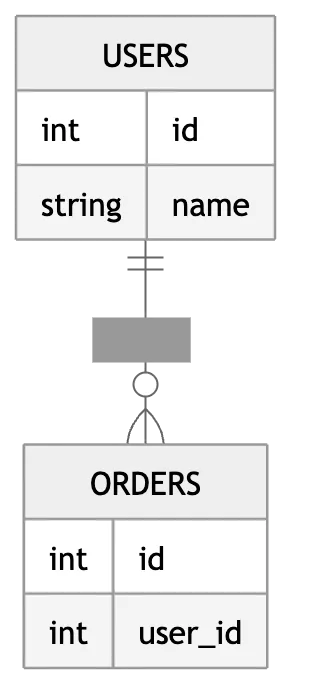
SQL databases are ideal when data has a well-defined structure and consistency is critical.
Common examples:
- PostgreSQL
- MySQL
- SQL Server
- Oracle
ACID Transactions
One of SQL's biggest strengths is ACID.
| Property | Meaning |
|---|---|
| Atomicity | All operations succeed or none do |
| Consistency | Data always remains valid |
| Isolation | Transactions don't interfere |
| Durability | Committed data survives failures |
Consider transferring ₹1,000 from Account A to Account B.
If the debit succeeds but the credit fails, money disappears.
Transactions ensure this never happens.
Why NoSQL Was Created
As internet applications grew, relational databases faced new challenges.
Imagine storing billions of social media posts.
Each post may have:
- Images
- Videos
- Reactions
- Comments
- Dynamic metadata
Trying to model this with rigid tables becomes increasingly complex.
Applications also needed to scale horizontally across hundreds of servers.
This led to the rise of NoSQL databases.
NoSQL doesn't mean No SQL.
It generally means Not Only SQL. A family of databases designed for flexible schemas and distributed scalability.
Types of NoSQL Databases
1. Document Databases
Document databases store data as JSON-like documents.
{
  "name": "Alice",
  "age": 28,
  "skills": ["React", "Node.js"],
  "address": {
    "city": "Bangalore"
  }
}
Perfect for:
- User profiles
- CMS platforms
- Product catalogs
- Mobile backends
Popular databases:
- MongoDB
- Firestore
- Couchbase
2. Key-Value Databases
The simplest database model.
Every value is retrieved using a unique key.
session:1234 → User Data
cart:9876 → Shopping Cart
token:xyz → JWT Payload
Extremely fast.
Ideal for:
- Sessions
- Authentication
- Caching
Examples:
- Redis
- DynamoDB
- Riak
3. Wide Column Databases
Instead of storing rows together, these databases store data by columns.
Designed for massive datasets spread across many servers.
Great for:
- Analytics
- IoT
- Time-series workloads
- Logging
Examples:
- Cassandra
- HBase
- ScyllaDB
4. Graph Databases
Some problems revolve around relationships rather than records.
Imagine:
Alice
↓
Friend
↓
Bob
↓
Works At
↓
OpenAI
Graph databases excel at traversing connected data.
Use cases:
- Social networks
- Fraud detection
- Recommendations
- Knowledge graphs
Examples:
- Neo4j
- Amazon Neptune
- JanusGraph
Modern Specialized Databases
Today's systems often use purpose-built databases alongside SQL and NoSQL.
Time-Series Databases
Optimized for timestamped data.
Examples:
- Server metrics
- IoT sensors
- Monitoring dashboards
Popular choices:
- InfluxDB
- TimescaleDB
- Prometheus
Vector Databases
Power AI applications by storing vector embeddings instead of plain text.
Perfect for:
- Semantic search
- Recommendation engines
- Retrieval-Augmented Generation (RAG)
- Similarity search
Examples:
- Pinecone
- Milvus
- Weaviate
- pgvector
Search Engines
Search systems optimize full-text search rather than transactional storage.
Features include:
- Relevance ranking
- Fuzzy matching
- Aggregations
- Full-text indexing
Popular options:
- Elasticsearch
- OpenSearch
In-Memory Databases
Store data in RAM for extremely low latency.
Typical use cases:
- Caching
- Session storage
- Rate limiting
- Leaderboards
Examples:
- Redis
- Memcached
SQL vs NoSQL
| Feature | SQL | NoSQL |
|---|---|---|
| Schema | Fixed | Flexible |
| Data Model | Tables | Multiple models |
| Transactions | Strong ACID | Varies by database |
| Scaling | Vertical and modern horizontal options | Built for horizontal scaling |
| Joins | Excellent | Ofter avoided or limited |
| Query Language | SQL | Database-specific APIs or query languages |
| Best for | Structured transactional data | Flexible, high-scale workloads |
Neither is universally better.
Each solves different problems.
Polyglot Persistence
One of the biggest misconceptions is that applications use only one database.
Modern architectures often combine several.
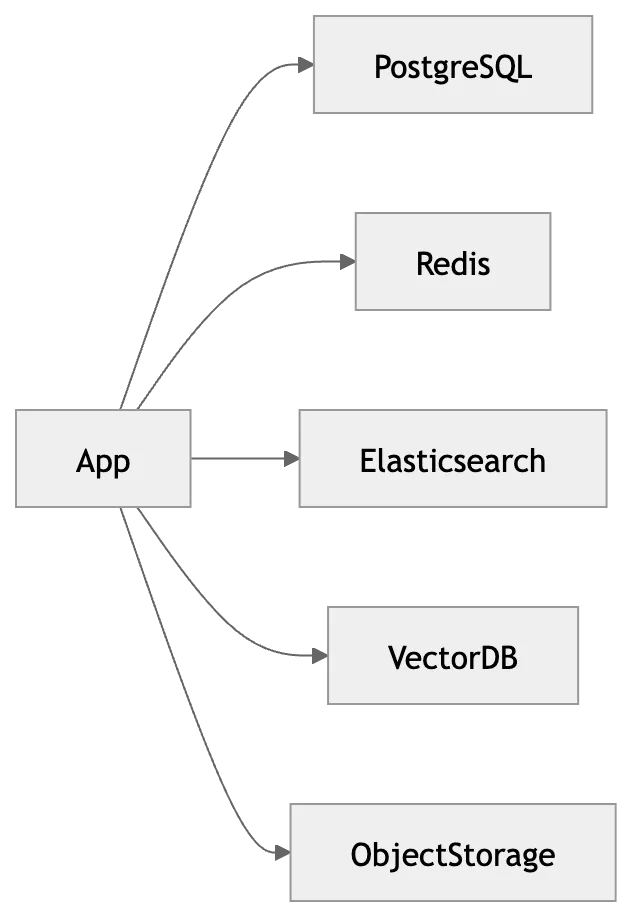
For example:
- PostgreSQL → Orders and payments
- Redis → Cache and sessions
- Elasticsearch → Product search
- Vector database → AI recommendations
- Object storage → Images and videos
Choosing the right database for each workload is known as polyglot persistence.
How to Choose the Right Database
Ask yourself:
- Is strong consistency critical?
- Do I need flexible schemas?
- Will relationships dominate queries?
- Am I handling billions of records?
- Is full-text search required?
- Am I building AI features?
- Do I need sub-millisecond access?
The answers guide the choice more than any popularity ranking.
Common Misconceptions
❌ NoSQL is always faster than SQL
Performance depends on workload, indexing, schema design, and access patterns.
❌ SQL databases don't scale
Modern relational databases support replication, partitioning, and various horizontal scaling strategies.
❌ Redis is just a cache
Redis supports streams, pub/sub, geospatial indexes, and more, though it's still commonly used as an in-memory cache.
❌ One database can solve every problem
Most large-scale systems combine multiple specialized databases.
Key Takeaways
- Databases exist to store, organize, and retrieve data efficiently.
- SQL databases excel at structured, transactional workloads.
- NoSQL is a family of databases designed for flexibility and scale.
- Document, key-value, wide-column, and graph databases solve different classes of problems.
- Modern applications often use time-series, vector, search, and in-memory databases alongside traditional databases.
- Choosing the right database depends on your application's data model, access patterns, consistency requirements, and scalability goals.
Conclusion
There is no universally "best" database, only the best database for a particular problem. Understanding the strengths and tradeoffs of SQL, NoSQL, and specialized databases allows you to design systems that are more scalable, maintainable, and efficient. As software systems continue to evolve, the most effective architectures will increasingly rely on multiple database technologies working together, each optimized for what it does best.
Final Takeaway
Great engineers don't choose between SQL and NoSQL. They choose the right database for the right workload. Modern software is powered by many specialized databases, each solving a different piece of the puzzle.