Imagine you're building an e-commerce application.
- A user opens the homepage.
- Clicks on a product.
- Adds it to the cart.
- Places an order.
Simple enough, right?
But behind every click, multiple things happen simultaneously:
- The browser sends a request.
- The application validates user input.
- Business rules are executed.
- Data is fetched from the database.
- The UI is updated with the latest information.
If all of this logic lived in a single file, the application would quickly become impossible to maintain.
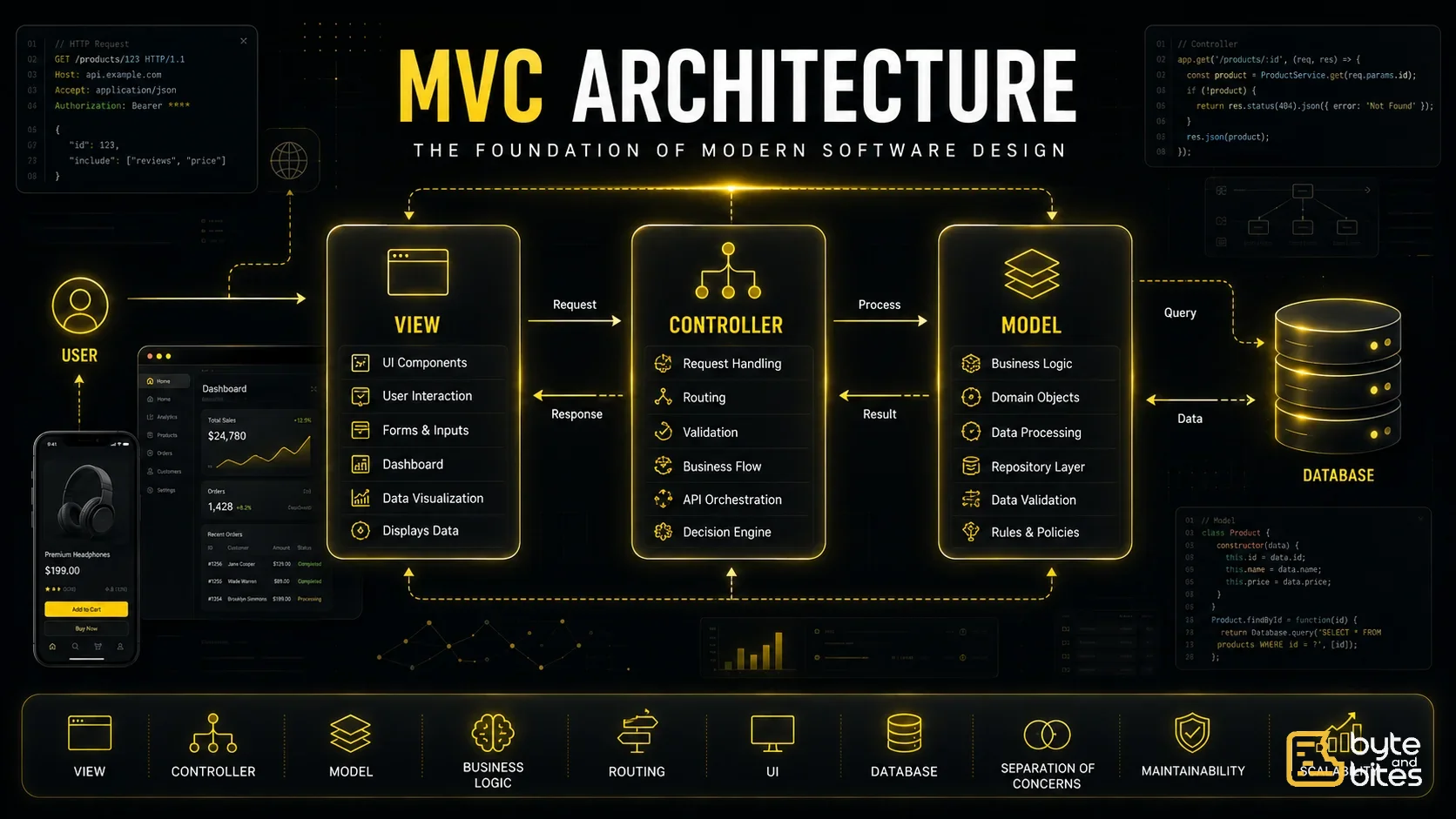
This is exactly the problem MVC (Model-View-Controller) was created to solve.
Rather than mixing user interface, business logic, and data access together, MVC separates each responsibility into its own layer.
This separation makes applications easier to develop, test, maintain, and scale.
The Problem Before MVC
Imagine writing everything in one file.
User clicks Login
↓
Read form values
↓
Validate input
↓
Connect to database
↓
Verify password
↓
Generate session
↓
Return HTML
↓
Update UI
Now imagine this file grows to 5,000 lines.
Soon you'll find:
- UI mixed with SQL queries
- Database logic mixed with HTML
- Validation spread everywhere
- Difficult debugging
- Poor code reuse
This is called tight coupling.
Changing one feature often breaks another.
What is MVC?
MVC stands for:
- Model
- View
- Controller
Instead of putting everything together, MVC divides responsibilities.
Each layer has one primary responsibility.
This idea is known as Separation of Concerns.
Understanding Each Layer
1. Model
The Model represents your application's data and business logic.
Think of it as the brain of your application.
Responsibilities include:
- Business rules
- Validation
- Database interaction
- Calculations
- Domain objects
Examples:
User
Product
Order
Cart
Invoice
Payment
The Model never knows how the UI looks.
Its only responsibility is managing data and business rules.
2. View
The View is everything the user sees.
Examples include:
- Web pages
- Mobile screens
- Dashboard widgets
- Buttons
- Forms
- Charts
Its responsibility is simple:
Display data.
The View should not contain business logic.
3. Controller
The Controller acts as the coordinator.
It receives user actions.
Then decides:
- Which Model should handle the request?
- Which business logic should execute?
- Which View should be displayed?
Think of it as a traffic controller.
Understanding MVC with a Login Example
Suppose a user clicks Login.
What actually happens?
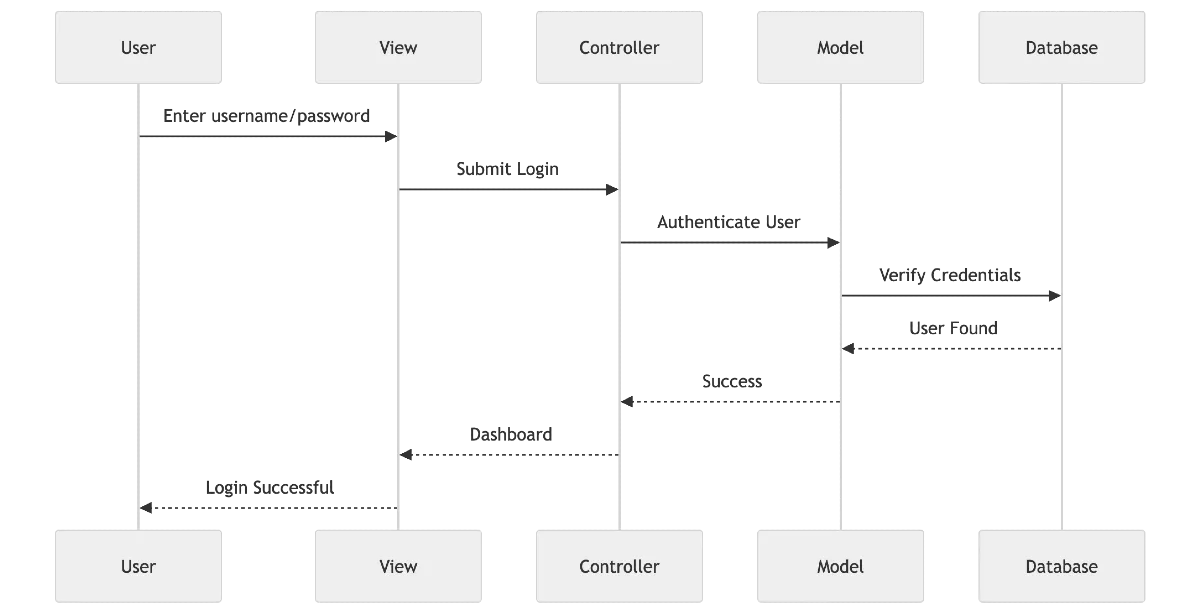
Notice something important.
The View never talks directly to the database.
Everything goes through the Controller and Model.
Responsibilities Breakdown
- Model → Business logic and data
- View → User interface
- Controller → Request handling and orchestration
Simple! Each layer has only one job.
Real Example: Shopping Cart
Suppose we click:
Add to Cart
What happens?
User
↓
View
↓
Controller
↓
Cart Model
↓
Product Database
↓
Cart Model
↓
Controller
↓
View
↓
Updated Cart
The controller doesn't calculate prices.
The view doesn't update the database.
The model doesn't render HTML.
Each layer stays focused.
Why MVC is So Powerful
Imagine your designer completely redesigns the website.
Should you rewrite business logic?
No.
Only the View changes.
Imagine switching from MySQL to PostgreSQL.
Should your UI change?
No.
Only the Model changes.
Imagine adding authentication.
Should every page know how passwords work?
No.
The Controller coordinates everything.
This separation makes software flexible.
Folder Structure
Most MVC projects look similar.
src/
controllers/
UserController.js
ProductController.js
OrderController.js
models/
User.js
Product.js
Order.js
views/
Home.html
Login.html
Product.html
routes/
services/
database/
As projects grow, this organization becomes invaluable.
Advantages of MVC
1. Separation of Concerns
Every component has one responsibility.
Cleaner architecture.
2. Easier Testing
Models can be tested independently.
Controllers can be mocked.
Views can be rendered separately.
3. Better Team Collaboration
Frontend developers work on Views.
Backend developers work on Models.
Application engineers focus on Controllers.
Everyone works independently.
4. Code Reusability
The same Model can power:
- Web app
- Mobile app
- REST API
- GraphQL API
Without rewriting business logic.
5. Easier Maintenance
Finding bugs becomes much easier because responsibilities are clearly separated.
Common Mistakes
1. Fat Controllers
Controllers become 2,000 lines long. → Bad.
Controllers should coordinate.
Not contain business logic.
2. Fat Views
Views performing calculations.
price * tax * discount
This is Bad Idea!
Move calculations into Models or services.
3. Fat Models
Sometimes Models become responsible for everything.
- Email sending.
- Notifications.
- Payment processing.
- Analytics.
This creates another maintenance nightmare.
Business logic should be organized into appropriate services as the application grows.
MVC in Popular Frameworks
Many popular frameworks are built around MVC principles.
- Laravel
- Ruby on Rails
- ASP.NET MVC
- Spring MVC
- Django (Similar to MVC)
- Express (Can be structured as MVC)
Even when frameworks use slightly different terminology, the underlying idea of separating concerns remains the same.
Does React Use MVC?
Not exactly.
React focuses primarily on the View layer.
Instead, modern frontend applications often use architectures inspired by MVC:
- MVVM (Popular in android)
- Flux (React)
- Redux
- Clean Architecture
The core principle remains the same:
Separate responsibilities.
MVC vs Modern Architectures
MVC → MVVM → Clean Architecture → Hexagonal → Microservices
MVC introduced the idea of separation.
Modern architectures expanded upon it.
When Should You Use MVC?
MVC works well for:
- CRUD applications
- Dashboards
- E-commerce websites
- Admin panels
- Content management systems
- Enterprise applications
It remains one of the best starting points for organizing application code.
When MVC Starts to Struggle
As applications become very large, additional architectural layers are often introduced.
For example:
- Service Layer
- Repository Pattern
- Dependency Injection
- Domain-Driven Design
- Clean Architecture
These patterns don't replace MVC—they build upon its foundation.
Mental Example
Think of a restaurant.
Customer
↓
Waiter (Controller)
↓
Chef (Model)
↓
Kitchen
↓
Waiter
↓
Customer (Menu / View)
The customer never walks into the kitchen.
The chef never serves tables.
The waiter coordinates everything.
That's MVC.
Key Takeaways
- Model manages data and business rules.
- View displays information to users.
- Controller coordinates requests and responses.
- Separation of concerns improves maintainability and scalability.
- MVC is a foundation that many modern architectures build upon.
Final Takeaway
Great software isn't built by putting everything together—it's built by knowing what to keep apart.